
How to join a TEAMS meeting
Quick guide to joining meetings on your phone
Prerequisites
• Meeting ID and Passcode sent to you.
________________________________________
Step-by-step tutorial
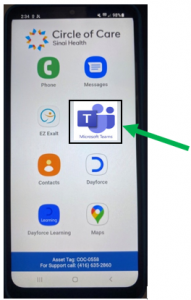
1. Open the Teams app
Find the Teams icon on your phone and tap it.
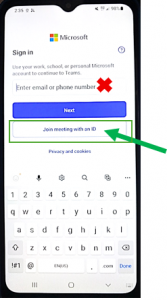
2. Choose “Join with an ID”
When asked to Sign in or Join, select Join a meeting with an ID. Do not sign in with email — choose the Join option.
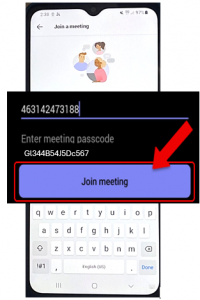
3. Enter Meeting ID and Passcode
Type the Meeting ID and Passcode exactly as provided, then tap Join meeting.
4. Check your preview
You’ll see a preview screen. Here you can:
o Turn Video on (camera icon) – this is mandatory for all training
o Turn Microphone on (mic icon) – this is mandatory for all training
o Choose a Background (background icon) – optional.
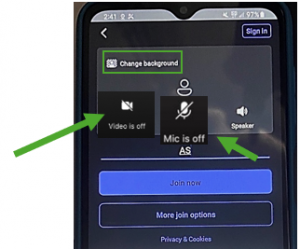
o Enter your full name
Type your full name in the name field so the host and other participants know who you are. This is mandatory as well.

5. Tap “Join Now”
Press Join Now. You may land in a waiting room — the host will admit you.
6. Turn camera on, mic off/on during meeting
Once in the meeting, tap the camera icon to start video and the microphone icon to mute/unmute. Keep your mic muted unless speaking.

7. Click the red phone to end the meeting.
8. Select speaker/audio device
If audio sounds wrong, tap the small arrow or audio settings near the mic to choose Phone Speaker, Headphones, or Audio Off.

9. Use the More menu (three dots)
Tap three dots … to find extra options: reactions (thumbs up), Raise Hand, meeting settings, and more.

10. Open Chat to type messages
Tap Chat to send text messages during the meeting. There is also a chat icon at the top right.
Quick Tips
- Join a couple minutes early to fix audio/video.
- Use headphones to avoid feedback.
- If you can’t hear, check the audio device setting first.
- If you see a black screen, toggle your camera off and on.
Troubleshooting
- I can’t join: Re-check Meeting ID and Passcode for typos.
- Audio issues: Plug in headphones or switch the speaker device in audio settings.
- App not opening: Restart the app or phone.