
Dayforce Learning Instructions
STEP 1:
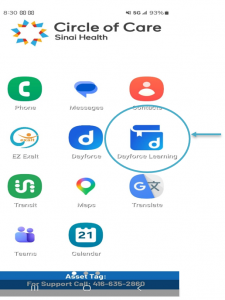
When you turn on your PSW phone, start by opening the Dayforce Learning App outlined here.
STEP 2:
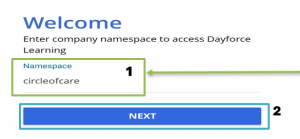
- After opening the Dayforce Learning App, you’ll be asked to enter the Company Namespace or ID before you log in. Our Company Namespace is “circleofcare” with no spaces or capital letters.
- Click <Next>
STEP 3:
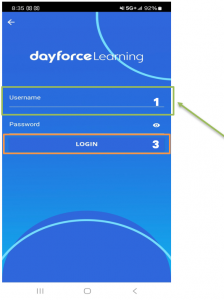
- Next, you can put your username and password to login. Your username is usually your first and last name with a dot in between. (Example: jane.doe)
- Same Username and Password as Dayforce
- Click <LOGIN>
STEP 4:
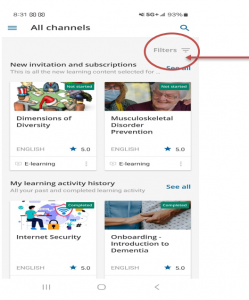
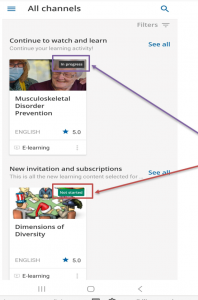
After logging in, you’ll be brought to your eLearning home page where you can see all of your eLearning.
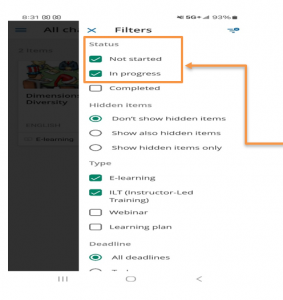
Click “Filters” to look for courses you haven’t finished/ started yet.
STEP 5:
Click “Filters” – under status select “Not Started & In progress”. This will allow you to see courses that you are enrolled in but have not started yet.
STEP 6:
After engaging the “Filters”. Now, you can see your new courses and courses you have “Not Started or In Progress”
STEP 7:
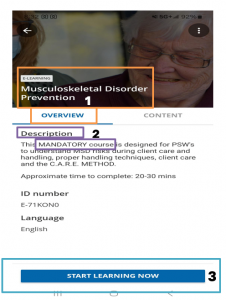
- Select the course you wish to complete. The course will open to the course overview.
- In the course overview, it provides a description of the course that tells you if the course is Mandatory.
- Scroll down and Click “Start learning Now”
*You will also receive communications via your mobile app messages about training, due dates, payments for training and mandatory courses.
STEP 8:
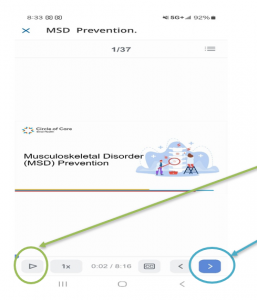
Once the course open and you can begin the course by pressing “Play” and to move forward, press the “next button [>]”
For New Staff
Two and four weeks after starting with us, you’ll receive a call from our team for your New Hire Check In so we can ask how you’re doing, answer your questions and make sure that you feel welcomed! During the call, you’ll be invited to our New Hire Support Forum where you can join other new staff and ask questions that may have come up for you while traveling in the community and caring for clients. This is a great opportunity to meet other people at Circle of Care and make sure you feel well supported during different situations that may come up during client visits.
We look forward to seeing you there!