Who To Contact

Who should you go to for questions or concerns about your client’s well-being or Care Plan?

  • Non-urgent – Call the Client Services Supervisor (CSS).
  • Urgent – Call the main line and a customer services representative will try to assist you. If they are unable to answer all of your questions, they will transfer you to the (CSS).
  • Emergency – call 911, then call the main line.

Who should you go to for questions or concerns about your schedule?

  • Non-urgent – Call your Service Coordinator
  • Urgent – Call the main line and speak to a Service Representative

At what times can you reach a Live Agent through our Office Main Line?

  • 24 hours a day, 7 days a week

Which of the following can you do to reach a Live Agent at our Office Main Line ?

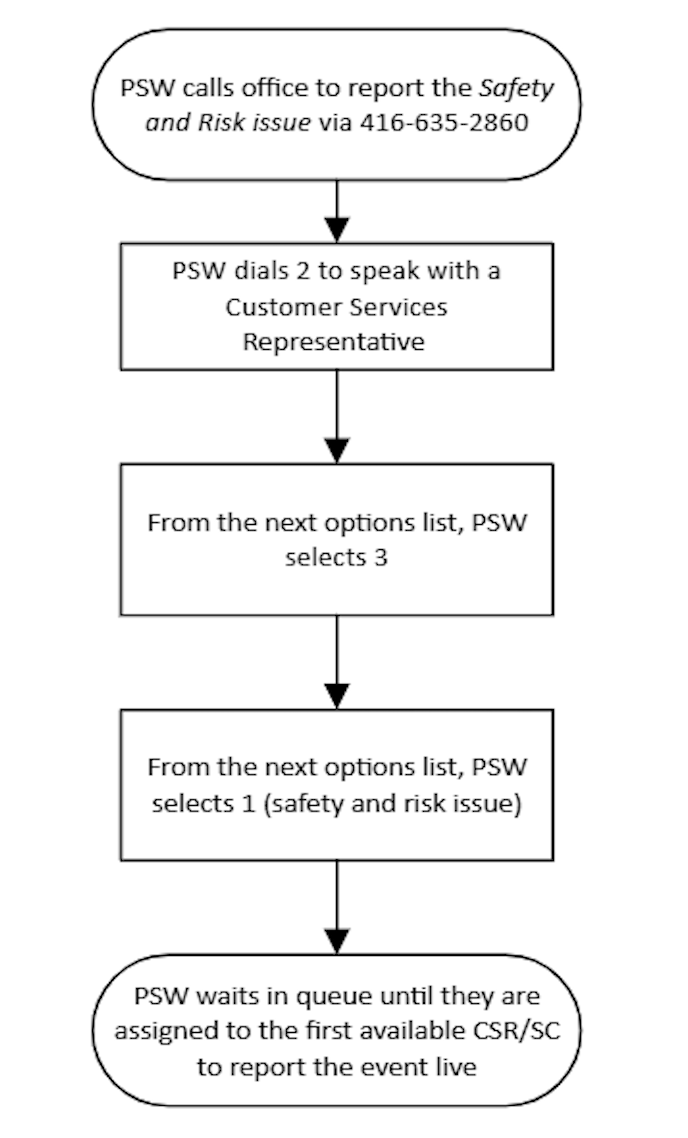
  • Call at 416-635-2860 (office main line) and follow the prompts.

What should I do when I start to notice changes in the way my clients Acts, Looks, or Copes (ALC) that are non-urgent?

  • Report via ALC checklist via mobile app.

When you notice ALC changes in your client that are urgent, as in they need to be addressed that same day because it might pose a potential safety risk, how should you report them?

  • Call the Office main line to report to a Live Agent.

If you notice immediate changes in how your client is behaving or coping that may indicate there is a medical or physical emergency, what should you do?

  • Call 911 for emergency services followed by advising office live and wait for emergency services to arrive.

Find the Urgency Level

What are urgent versus non-urgent situations?

Non-Urgent vs Urgent vs Emergencies

Non-Urgent Situations

Urgent Situations

Emergency Situations

What to Do

Enter this into the Act, Looks, Copes (ALC) section in your phone app (EZ Exalt).

Contact the main office line to make a report to a live agent.

First: Call 911

Then call main office to make report.

Talking to Live Agent Required?

NO

YES

YES

Examples:

Non-Urgent Situations

  • You notice a change in your client (e.g. they seem a little less engaged), notice a bit of reddened skin, or they tell you something that would benefit from informing your supervisor but there is no immediate risk/harm concerns.

Urgent Situations

Client related:

  • Not Seen Not Found
  • Safety Risk/Issues
  • Client requests more time
  • Client requests PSW to leave early
  • Client falls (no injuries, client is able to get up by themselves)

PSW related:

  • Sick Calls
  • Family Emergency
  • You’re running late (more than 15 min)
  • Unsafe work practices

Emergency Situations

  •  Medical or physical emergencies where you or the client are in immediate safety risk.
  • Client is choking, has difficulty breathing, becomes unconscious or is extremely ill.
  • Client falls and is injured (unable to get up on their own).
  • Fire that cannot be put out.
  • Witnessed violence or abuse.

Reporting High Risk Situations

Not Seen Not Found Visits

How to do a Safety Check when the client is not found:

  • Call office live to report
  • Knock on the door
  • Check surroundings
  • Check windows and doors
  • Check with Superintendent if applicable or neighbours
  • Read the mobile notes for instructions
  • Remain at the site for a minimum of 30 minutes to complete the safety check then call office back live for further instructions.

Reporting Emergencies – Fire

In the case of a fire:

  • If a small fire cannot be put out within a few seconds by you or the client, leave the home immediately with the client.
  • If you’re unable to move the client away from danger, leave immediately and call 911.
  • Wait for help to arrive and report to a Live Agent through the Office main line immediately.

Reporting Emergencies – Client Illness

In regards to client illness:

  • In the case of choking, unconsciousness, etc. call 911 first THEN call the Office main line immediately.
  • Do not move a suddenly ill or unconscious client – use your best judgement and first aid knowledge to keep the client as safe as possible.
  • Wait for paramedics to arrive then and report the incident to a Live Agent through the Office main line.

Reporting a High Risk Situation – Client Falls

Once the client has fallen:

  • Take a moment to evaluate the situation
  • Do not move the client if they are unable to get up by themselves
  • If any injury has occurred, then it is an emergency situation, and you should seek help immediately – call 911
  • Report to a live agent through the Office main line
  • Keep the client calm, comfortable and warm until help arrives

Reporting Elder Abuse

  • If you suspect elder abuse that’s not high risk, you should inform your CSS by leaving a voicemail at their ext. # and the CSS will follow up with the client within 48 hours.
  • If the suspected elder abuse is high risk, you should contact a Live Agent through the Office main line for the soonest available CSS to address the issue.
  • If the client does not have food, heating, cooling, or other basic needs, you will need report this to the social work team who will make every attempt to provide for the client’s immediate needs.

Reporting Abuse When Someone is in Immediate Danger

  • If you see a client being abused or believe they are in immediate danger, make sure they are safe and call 911 right away.

When To Call

YOU MUST CALL THE OFFICE MAIN LINE IN THE FOLLOWING INSTANCES:

Client Condition:

  • If you notice a change in the client’s physical, emotional or social situation
  • If the client refuses to let you in
  • If the client does not answer the door when you arrive. In this case, telephone the client first – if there is no answer, try to see if there is a superintendent who will open the client’s apt. door for you. You must wait outside the client’s home until someone from the office calls you back and gives you permission to leave – this is considered a “Not Seen Not Found visit”
  • If you become aware that the client has been hospitalized, sent to a nursing home or is staying elsewhere – this is considered a Not Seen Not Found visit
  • If your client wants or needs more help or more time
  • If you are requested to do banking or to engage in any financial matter
  • If client requests or requires service beyond the scope of your expected or normal duties/routines not authorized by Circle of Care
  • If you and your client have a disagreement

Check In and Check Out time:

  • If you are going to be more than 15min late for any reason. This way your Client Service Representative can inform the client about the delay.
  • If you finish your assignment 15 min or more than scheduled time, call to office main line, Client Service Representative will ask for verbal confirmation if they had a consent from the client to leave early and we do visit verification in EC. If the worker is still at home, CSR will try and get a confirmation from the client (either out load or speaking to the client) and then confirm the visit verification in EC.
  • PSWs should not leave the client site before calling and confirming from office to avoid any miscommunication or impact on the service.

Unsafe work practices:

  • If the client insists that you perform a task that you have not been taught how to do
  • If the client insists that you perform a task that you have been told not to do (e.g. tasks that contravene Circle of Care’s policy).
  • If you observe a home situation which may pose a risk to the client and or worker (e.g. no heat, no hydro, lack of clothing or food, rodents, infestations, smoking risks, fire hazards).
  • If you have any safety concerns for yourself or your client.

Client Emergency:

  • If an emergency situation arises (e.g. client fall or sudden illness)
  • See table above

Worker Emergency:

  • If you have an accident and injured yourself at the client’s home, or traveling between assignments.

Worker Illness/Absence:

  • If you become sick while at work and cannot finish your assignments for the day.
  • If you are unable to come to work because of illness or any other reason, you must immediately notify the Office main line (CSR).

Calling in Sick:

If you fall sick, it’s expected that you notify a Live Agent as soon as you can.

  • Call the office main line at 416-635-2860 and listen to the voice prompts
  • Remember to speak to a Live Agent for each day that you are unwell
  • Wait for confirmation
  • HRDept@circleofcare.com must receive a doctor’s note from you if you are sick for 4 or more days

REMEMBER there is always someone to answer your call 24/7

Contacting the Office

How to Contact a Client Service Representative (CSR), Your Client Services Supervisor CSS), or Service Coordinator (SC)

  • There is always a CSR available to assist you by calling the office main line. Here are some examples which CSR agent can help you with; Sick calls, Not Seen Not Found, Running late, Visit verification, Fall report.

You can reach your CSS or SC in the following ways:

In non-urgent/non-emergency situations:

  • You may telephone the office at 416-635-2860 plus your CSS/ SC extension number during Circle of Care’s regular office hours: Monday through Friday 8:30 a.m. to 4:30 p.m. During after hours, they will call the main line and select speak to the live agent i.e CSR or Answer plus.
  • If your CSS/SC is not available, and you do not need a quick response, leave a message on his/her voicemail. Be sure to include your name and the telephone number at which you may be reached.

In urgent/emergency situations:

  • You may telephone the office at 416-635-2860 and contact the Client Service Representative for help.

Understanding Your Daily Schedule

For clarification or confirmation regarding information in your schedule, please call the Office main line at (416) 635-2860.

Visit Verification

Visit verification is a job expectation and is required by our funders. All PSWs and Homemakers are required to verify in and out for every client visit.

You must verify every visit using the following methods and in the following order:

  1. Mobile phone: Verify in and out.
  2. If mobile phone is not working for the client visit: verify IN and OUT using the client’s home phone & Telephony System:
    • At the START of the visit, use telephony system, call 647-478-8424 to verify IN – Press 7 and follow instructions.
    • At the END of the visit, use telephony system, call 647-478-8424 to verify OUT – Press 7 and follow instructions.
  3. If telephony is not working for that visit: Call the Client Support Centre (416-635-2860) and stay on the line to speak with a Client Support Centre representative.
  4. If PSW mobile phone is not working, then current practice is that PSW calls in office from their personal phone (practice is call after every client visit upon completion while they are at client’s home). CSR will note that PSW phone is not working in EC and will also advise on the rest of the day’s schedule to PSW. This is a Last Resort!
    • At the START of the visit, call Client Support Centre to verify IN and provide your name, voicemail number, client you are visiting, start time of the visit, and reasoning as to why you were not able to use options one and two first.
    • At the END of the visit, call Client Support Centre to verify OUT and provide your name, voicemail number, client you are visiting, end time of the visit, and reasoning as to why you were not able to use options one and two first.

Remember: Failure to comply with this procedure will result in the visit being unpaid.