Who To Contact - Quick Guide

Who should you go to for questions or concerns about your client’s well-being or Care Plan?
Client Service Supervisor

Who should you go to for questions or concerns about your schedule?
Service Coordinator

At what times can you reach a Live Agent through our Call Centre?
24 hours a day, 7 days a week

Which of the following can you do to reach a Live Agent at our Call Centre faster?
Call in using your PSW mobile phone because you’ll be placed in a much faster queue

What should I do when I start to notice changes in the way my clients acts, looks, or copes?
Contact the Call Centre to make a report on the status of the client.

When you notice ALC changes in your client that are urgent, as in they need to be addressed that same day, how should you report them?
Call the Call Centre to report to a Live Agent

If you notice immediate changes in how your client is behaving or coping that may indicate they could be in danger, what should you do?
Call 911 for emergency services

What’s an Urgent call?
An urgent call is a call where you must speak to a live agent.

Examples include:

  • Not Seen not found visits
  • Sick calls (if you’re sick please notify us as soon as possible)
  • Safety issues
  • Family emergency
  • If the client is requesting more time
  • If the client is requesting the PSW leave early, we would need to contact or speak to the client
  • If you are running behind by more than 15 minutes

Calling in Sick
If you fall sick, it’s expected that you notify a Live Agent as soon as you can:
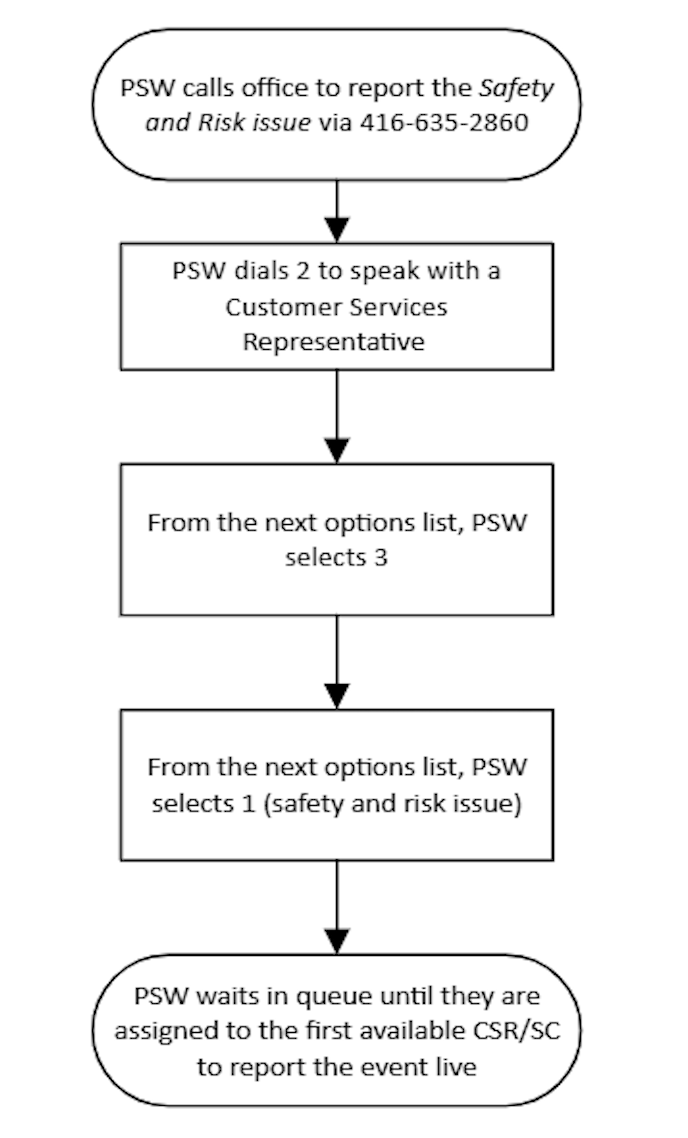
Call the call center at 416-635-2860 and listen to the voice prompts
Remember to speak to a Live Agent
Wait for confirmation
Your Service Coordinator must receive a doctor’s note from you if you are sick for 3 or more days

Requests for vacation and statutory holidays are submitted through your mobile device.

Reporting High Risk Situations
A Not Found Visit (NFV) is when the PSW shows up the clients home and the client is not there or not responding to the door. It could be that the client went out and then left a note.
When this happens, please make sure to:
Call the office immediately
Report the NFV to a LIVE person (no messages!)
Wait for instruction
You may be asked to check other locations

Reporting Emergencies – Fire
In the case of a fire:
If a small fire cannot be doused within a few seconds by you or the client, leave the home immediately with the client.
If you’re unable to move the client away from danger, leave immediately and call 911
Wait for help to arrive and report to a Live Agent through the Call Centre immediately

Reporting Emergencies – Client Illness
In regards to client illness:
In the case of choking, unconsciousness, etc. call 911 first THEN call the call centre immediately
Do not move a suddenly ill or unconscious client – use your best judgement and first aid knowledge to keep the client as safe as possible
Wait for paramedics to arrive then and report the incident to a Live Agent through the Call Centre

Reporting a High Risk Situation – Client Falls
Once the client has fallen:
Take a moment to evaluate the situation
Do not move the client if they are unable to get up by themselves
If any injury has occurred, then it is an emergency situation, and you should seek help immediately – call 911
Report to a live agent through Call the Call Centre
Keep the client calm, comfortable and warm until help arrives

Reporting Elder Abuse
If a PSW suspects elder abuse that not high risk, they should their CSS by leaving a voicemail at their ext. # and the CSS will follow up with the client within 48 hours.
If the suspected elder abuse is high risk, the PSW should contact a Live Agent through the Call Centre for the soonest available CSS to address the issue.
If the client does not have food, heating, cooling, or other basic needs, employees will report to the social work team who will make every attempt to provide for the clients immediate needs.

Reporting Imminent Risk Elder Abuse
When there is imminent risk of abuse, such as witnessing the client being abused, PSWs will ensure the client’s safety and call 911 to report immediately.

When To Call The Call Centre

YOU MUST CALL THE CALL CENTER IN THE FOLLOWING INSTANCES:

Client Condition:

  • If you notice a change in the client’s physical, emotional or social situation
  • If the client refuses to let you in
  • If the client does not answer the door when you arrive. In this case, telephone the client first – if no answer, try to see if there is a superintendent who will open the client’s apt. door for you. You must wait outside the client’s home until someone from the office calls you back and gives you permission to leave – this is considered a “not found visit”
  • If you become aware that the client has been hospitalized, sent to a nursing home or is staying elsewhere – this is considered a Not Found Visit
  • If your client wants or needs more help or more time
  • If you are requested to do banking or to engage in any financial matter
  • If client requests or requires service beyond the scope of your expected or normal duties/routines not authorized by Circle of Care
  • If you and your client have a disagreement

Time:

  • If you are going to be late for any reason. This way your Service Coordinator can inform the client about the delay
  • If you finish your assignment earlier than scheduled

Safety:

  • If the client insists that you perform a task that you have not been taught how to do
  • If the client insists that you perform a task that you have been told not to do (e.g. tasks that contravene Circle of Care’s policy)
  • If you suspect that the client has been abused
  • If you observe a home situation which may pose a risk to the client (e.g. no heat, no hydro, lack of clothing or food, rodents, infestations, smoking risks, fire hazards)
  • If you have any safety concerns for yourself or your client

Client Emergency:

  • If an emergency situation arises (e.g. client fall or sudden illness)

Worker Emergency:

  • If you have an accident and injure yourself at the client’s home, or traveling between assignments

Worker Illness/Absence:

  • If you become sick while at work and cannot finish your assignments for the day
  • If you are unable to come to work because of illness or any other reason, you must immediately notify the call centre and then call your Service Coordinator before 3:00 p.m. each day to let your supervisor know whether or not you will be returning to work the next day
  • If you require time off, give your Service Coordinator your request in writing, at least two weeks before you want to be off. During the summer months and at Christmas time eight weeks notice is required.

REMEMBER there is always someone in the Call Centre to answer your calls and help you from Monday to Sunday, between the hours of 7:00 am – 8:30 pm

Sick Leave Process

Circle of Care provides the following sick leave program to assist employees who are absent from the workplace due to personal illness or injury. Employees have a responsibility to make every effort to ensure that they return to work in a state of health and well-being which will enable them to perform their job to the best of their abilities.

Personal Support Workers (PSW) and Homemakers who complete 1300 hours of service within the calendar year are eligible for full-time status the following calendar year. All full-time PSWs and Homemakers are entitled to 51 hours of sick time per calendar year. This annual allotment of sick time hours will not be lost if you do not use them. These hours will be transferred into your sick bank (to a maximum of 200 hours) which can be used for medical emergencies such as unexpected injuries, surgery and recovery time.

Sick time is to be used when you are ill. It is not to be used for arranging medical appointments in advance. Here are some examples of appropriate and inappropriate use of sick time:

Appropriate Sick Time Usage
  • The employee is ill (flu/ cold)
  • The employee is injured
  • The employee requires surgery and recovery time
  • The employee has a personal medical emergency
Inappropriate Sick time Usage
  • Your child is sick or needs a babysitter
  • Doctor’s check up and appointments
  • Dentist appointment
  • Waiting for a repairman
  • Heavy snow of very cold/hot weather
  • Request for vacation or statutory holiday that has not been approved
Call-In Procedure

An employee who is scheduled to work and is unable to do so due to illness or injury, shall notify the Employer at least three (3) hours before the first scheduled visit of the workday. In all instances, employees should attempt to provide as much absence notification as possible when they are going to be absent. Please call 416-635-2860 when calling in sick (as this central line is monitored 24/7) and ensure you are speaking to someone live.

Absence from work due to illness in excess of three (3) days must be supported by a doctor’s note or at the discretion of the Manager/Supervisor. If a Supervisor/Manager has reason to suspect an absence is not legitimate (i.e. pattern of unexplained absences) the employee may be required to produce a doctor’s note in order to qualify for paid sick leave even if the absence is less than three (3) days. Doctor’s notes and associated costs are the sole responsibility of the employee. Failure by an employee to provide appropriate evidence related to the use of sick leave when requested by their Manager/Supervisor may result in disciplinary action up to and including termination of employment.

How to Contact Your Supervisor or Service Coordinator (CSS or SC)

There is always a Circle of Care Client Service Supervisor (CSS) or Service Coordinator (SC) available to you.

You can reach you CSS or SC in the following ways:

In non-emergency situations:

  • You may telephone the office at 416-635-2860 plus your CSS/ SC extension number during Circle of Care’s regular office hours: Monday through Friday 8:30 a.m. to 4:30 p.m.
  • If your CSS/SC is not available, and you do not need a quick response, leave a message on his/her voice mail. Be sure to include your name and the telephone number at which you may be reached.

If your CSS/SC is not available, and you need a quick response, follow the directions that he/she has left on his/her voice mail regarding whom you should speak to. If he/she has not left specific instructions, press “0” and tell the Circle of Care receptionist that this is an emergency and you need to speak to any available supervisor in the Client Services Department.

In emergency situations call the Call Centre at (416) 635-2860

Understanding Daily Schedule

Upon employment, workers are given a mobile phone to access their schedules, information on client care, and communicate with the office. It is the responsibility of the PSW and Homemaker to check their mobile phone before and after each and every visit, as scheduling can change throughout the day. For clarification or confirmation regarding information in your schedule, please call the Call Center at (416) 635-2860.

Recommended Times To Check Schedule

  • An hour before your availability starts.
  • Refresh before and after each and every visit.
  • In the evening after you have finished attending to your last client.

Visit Verification

Mobile Devices

All PSWs at Circle of Care are issued a mobile phone to be used as a tool for work purposes. It helps you to deliver optimal care by being able to check in and check out of visits easily (verifying), to receive important and timely information on client care (notes and care plans) and to communicate with your Service Coordinators and supervisors.
All Circle of Care’s PSW mobile phones are equipped with a specialized ‘app’ (or application) that will be your ‘one-stop-shop’ for verifying visits, checking your schedule and understanding the unique care needs each client is assigned. When commencing employment with Circle of Care, you will be issued a phone, user guide, and specific applications training to walk you through how to use the app/your phone.
All PSWs are required to read, understand and sign off on Circle of Care’s Mobile Device Policy in order to receive and work with a phone.

Visit Verification

  • Visit verification is a job expectation and is required by our funders. All PSWs and Homemakers are required to verify in and out for every client visit.
  • Only verify IN to a visit once you are WITH the client, not before! Seeing the client ensures they are safe and it allows you to perform the ALC checklist.
  • It is your responsibility to ensure your Circle of Care mobile phone is always charged and working!

For cluster sites and visits:

  • If you work in a “Cluster Site”, please verify in and out for every visit!
  • If the visit is less than 1 hour long (e.g., 15 minute visit), you will have a 1 hour window to provide service according to the time the visit is scheduled, in order to be fully paid for that visit.

You must verify every visit using the following methods and in the following order:

  1. Mobile phone: Verify in and out.
  2. If mobile phone is not working for the client visit: verify IN and OUT using the client’s home phone & Telephony System:
    • At the START of the visit, use telephony system, call 647-478-8424 to verify IN – Press 7 and follow instructions.
    • At the END of the visit, use telephony system, call 647-478-8424 to verify OUT – Press 7 and follow instructions.
  3. If telephony is not working for that visit: Call the Client Support Centre (416-635-2860) and stay on the line to speak with a Client Support Centre representative. This is a Last Resort!
    • At the START of the visit, call Client Support Centre to verify IN and provide your name, voicemail number, client you are visiting, start time of the visit, and reasoning as to why you were not able to use options one and two first.
    • At the END of the visit, call Client Support Centre to verify OUT and provide your name, voicemail number, client you are visiting, end  time of the visit, and reasoning as to why you were not able to use options one and two first.

Remember: Failure to comply with this procedure will result in the visit being unpaid.

Leave of Absence & Requesting Time Off

These forms are used to request paid or unpaid time off work that exceeds 10 days.

Requests for Vacation and Statutory holidays must be made through your mobile phone.

Complete this form in its entirety and request the LOA or Time Off with as much notice as possible.

Leave of Absence/Time Off Request Form